Loading
ReefSense ORP Probe
Introduction
The ReefSense ORP Probe adds continuous ORP (REDOX) monitoring to your ReefControl Pro/Lite. It reports your aquarium’s ORP in real time to the ReefBeat App – with 30-day logs and notifications – and it can use that reading to switch equipment such as an ozonizer automatically.
Because it stays installed in your aquarium, it tracks ORP continuously, so trends and sudden shifts show up as they happen rather than at the next manual test. And because it’s digital, it reports directly in millivolts, guides you through validation step by step, and stores its own settings.
This manual assumes you already have a ReefControl Lite or Pro set up and running in the ReefBeat App. If you don’t, set up your ReefControl Pro/Lite first using its own manual, then come back here to add the ORP Probe.
Understanding ORP in your reef aquarium
ORP – oxidation-reduction potential, also called REDOX – is a measure in millivolts (mV) of how strongly your water tends to oxidise and break down organic waste. In a reef aquarium it’s best thought of as a trend indicator rather than a precise water-quality figure: a steady ORP usually means stable biological and chemical conditions, while a sudden change can flag feeding, dosing, a heavy organic load, a fouled probe, poor aeration or another disturbance.
Typical reef aquariums sit somewhere around 250-400 mV, but the exact figure varies from system to system and probe to probe. What matters is the direction and stability of your own tank’s ORP, not hitting a particular number. ORP often follows a daily rhythm – dropping after feeding or busy biological periods, and rising as organics are removed, aeration improves, or ozone is used.
Persistently low ORP often points to insufficient skimming, overfeeding or detritus build-up. Ozone raises ORP, but it shouldn’t be chased aggressively – very high oxidation can stress your livestock. For a reliable reading the probe needs to be clean, fully hydrated and given time to settle: a new or freshly cleaned probe takes a while to stabilise, and a dirty one can read incorrectly. Read ORP alongside your other parameters – especially pH, aeration, organic load, skimming, feeding and any ozone use.
What’s in the box
• ReefSense ORP Probe – R35822
Installation and placement
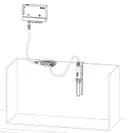
Position the probe in the aquarium or sump where there is good, steady water flow, using a probe holder, with the sensing tip fully immersed at all times. The ReefSense single probe holder (R35837) is an optional accessory for positioning the probe.
1. Remove the storage cap before use. The probe ships with a storage cap – held on by a compression fitting – that keeps the sensing tip wet and stops the storage solution leaking during transport and storage. Take it off before installing the probe. Keep the cap: you can refill it with storage solution to keep the tip wet if you ever take the probe out of service.
2. Fit the probe into your probe holder and position it in the water with good flow around the sensing tip.
3. Connect the probe to the ReefSense port connector cable, making sure the securing nut is fully closed for a stable, waterproof connection.
4. Arrange the cable into a drip loop so water can’t run down it to the connector.

Note:
The sensing tip must not dry out. Keep the probe in water at all times – in the aquarium, or stored wet (in KCl storage solution) when it isn’t installed.
Adding the probe in the ReefBeat App
Add the probe to your ReefControl Pro/Lite in the app:
1. Open your ReefControl Pro/Lite in the ReefBeat App and choose Setup Probe, then select ORP.
2. The app shows the ID of the probe it has found so you can confirm you’re setting up the right one, then continue. (If the app doesn’t detect the probe, check the connection and try again.)
3. If a newer version of the probe’s firmware is available, the app updates it before continuing over Bluetooth – keep your phone within approximately 3 m (10′) of the probe and leave the app open during the update.
4. Give the probe a name, or keep the default.
5. Set the parameter ranges for ORP (in mV) and choose whether to switch on the audible alarm for this probe.
Note:
You can add more than one ORP Probe to the same ReefControl Pro/Lite. If you do, connect and set them up one at a time. If several new probes are connected at once before setup, the controller picks one of them at random, and you’ll have to check serial numbers to tell which is which.
Parameter ranges (Desired / Acceptable / Danger). For each parameter you set two ranges that tell ReefControl Pro/Lite what “normal” looks like for your tank: a Desired range (green, your target) and an Acceptable range (orange, drifting away from the target). Anything outside the Acceptable range is automatically the Danger range (red) – you don’t set this yourself. Because ORP is a trend rather than a fixed target, set these around your own tank’s stable range so you’re alerted to meaningful shifts. Your readings show against these on the homepage and in the graphs, and you can choose, for each parameter, to be notified when a reading enters its Danger range. You can also switch on the audible alarm; it is then enabled whenever a reading is outside the Acceptable range, and a short press of the Manual Control button silences it.
Note:
A new ORP Probe needs time to settle before it reads reliably. Let it stabilise in the aquarium for a while after installation before its first validation (see Validation).
Validation
An ORP Probe reports its reading directly in millivolts (mV), so – unlike the pH and Salinity probes – it isn’t calibrated. Instead you validate it against a reference solution of known mV and, if needed, apply a small offset so your readings share a consistent baseline.
When to validate
The sensing element inside an ORP Probe ages gradually with use, so its readings may slowly drift over time. Adjusting the offset to match your reference solution re-aligns the reading to a known value – because ORP is read mainly as a trend, this is less about absolute accuracy than about holding a steady baseline, so you can keep tracking the trend reliably as the probe gradually deteriorates. For a reef aquarium we recommend validating the ORP Probe – and adjusting its offset if needed – about every two months. With good care, a ReefSense ORP Probe lasts up to about 12 months of continuous use.
What you need
An ORP reference (validation) solution of known mV. Red Sea offers the ReefSense ORP 460 mV Validation Solution (R35854); it isn’t supplied with the probe, so order it separately. You’ll also need a small clean container to hold the solution and some RO water for rinsing. Always use fresh solution and don’t reuse solution the probe has already been in.
The validation process
The ReefBeat App guides you through each step:
1. When prompted, clean the probe, rinse it with RO water and dry it – this stops residue from contaminating the solution. Dry only the outside of the probe; never wipe the sensing tip, as this can damage it and make readings unstable.
2. Place the probe in the reference solution and gently wiggle it to release any air bubbles trapped against the sensing tip.
3. The app shows the measured ORP value, which should stabilise within about 15-20 seconds.
4. The reading should be within 30 mV of the solution’s nominal value (460 mV for the R35854 solution). If it’s more than 30 mV away, clean the probe again and repeat. If it still doesn’t improve after repeated cleaning, the probe has reached the end of its life and should be replaced.
5. When the validation looks good, apply the offset as shown in the app.
6. Rinse the probe and return it to the aquarium, then wait about 30 seconds before closing the validation in the app, to keep stray readings out of your logs.
You can validate at the aquarium or in remote mode (see Remote mode).
Remote mode
You can use the ORP Probe away from the controller, over Bluetooth – handy for taking a reading or validating at a sink rather than working down beside the sump. In remote mode the probe can be used for manual readings and for validation.
1. Turn on remote use for the probe in the ReefBeat App.
2. Disconnect the probe from the ReefSense port connector.
3. Power the probe with the ReefSense USB-C connector (sold separately), plugged into any USB-C source.
4. In the app, tap Connect to start the Bluetooth (BLE) connection between the app and the probe.
When you’ve finished, you can tap Disconnect in the app, or simply remove power from the probe – once the probe is unpowered it disconnects automatically. Keep the sensing tip in water throughout. After returning the probe to the aquarium, wait about 30 seconds before cancelling remote mode in the app, to keep stray readings out of your logs.
Firmware updates
From time to time the ReefBeat App will let you know that a firmware update is available for your ORP Probe. Keeping the firmware up to date ensures it stays compatible with the app. Firmware updates are performed via Bluetooth; the probe must be connected to your ReefControl Pro/Lite and not in Remote mode (ensure Bluetooth is enabled in your phone’s settings). When you run an update, keep your phone within approximately 3 m (10′) of the probe and leave the app open during the update.
Using the ORP reading to control equipment
Like any ReefSense reading, your ORP value can switch equipment on and off automatically. The most common use is controlling an ozonizer: because ozone raises ORP, you can have the ORP Probe switch the ozonizer off once ORP reaches a chosen level and back on as it falls, keeping oxidation within a safe band. The ORP Probe can control a 12 VDC port on the controller, or – if you have a ReefControl Power – any of its AC sockets.
Set the relevant port or socket to be controlled by the ORP Probe, choose the value at which it switches, and set a fallback state in case the probe is ever disconnected. Choose a sensible maximum – pushing ORP too high with ozone can stress livestock. (See your ReefControl Pro/Lite manual for how to assign a port or socket.)
Maintenance
The ORP Probe has a delicate sensing tip. Treat it gently – never wipe, rub or scrub the sensing tip, as this damages it and makes readings unstable. Clean by rinsing and soaking only, and keep the tip hydrated at all times.
Routine cleaning. Rinse the probe under RO water to remove salt and loose film. After a routine rinse the probe can go back into service, though it may take a little while to settle.
Removing stubborn fouling. If organic film or mineral deposits have built up, clean in two stages, rinsing well with RO water between and after each stage:
1. Remove organics first with a diluted, plain (unscented) household bleach solution – 1 part bleach to 10 parts RO water. Soak the tip for 2-5 minutes, then rinse thoroughly with RO water.
2. Then remove mineral deposits with Red Sea’s probe cleaning solution (R35855), a weak acid, diluted 1:10 with RO water. Soak for 2-5 minutes, then rinse thoroughly with RO water.
WARNING:
Never allow bleach and the acid cleaning solution to mix – combining them releases toxic chlorine gas. Rinse the probe thoroughly with RO water between the two stages, never soak it in both at once, and handle household bleach with care.
Re-validate after cleaning. Let the probe rehydrate and stabilise after cleaning – in the aquarium or in KCl storage solution – then validate it before relying on the reading (see Validation). A freshly cleaned ORP Probe can take a while to settle.
You can do cleaning and validation comfortably at a sink in remote mode (see Remote mode).
Tip:
Before taking the probe out of the water – for cleaning, for example – turn on Disable Probe in its settings so out-of-water readings aren’t recorded. Remember that a port or socket controlled by the probe switches to its fallback state while the probe is disabled.
It’s a wear part. The sensing element has a limited service life (up to about 12 months of continuous use). The probe tracks its own health and the app warns you as it ages, so you can replace it before readings become unreliable.
Troubleshooting
Press here for the Troubleshooting guide for the full ReefControl Family
Warranty
Note:
The ReefSense ORP Probe contains a sensing element that wears with use and has a limited service life, so it carries a 6-month warranty (rather than the standard 24 months that applies to most ReefControl and ReefSense items).