Loading
ReefSense Temperature Probe
Introduction
The ReefSense Temperature Probe adds continuous, accurate temperature monitoring to your ReefControl Power or ReefControl Pro/Lite – and it can use that reading to switch your equipment automatically.
It is the only ReefSense probe that connects directly to both ReefControl Power and the ReefControl Pro/Lite. Connected to ReefControl Power, it lets you run heater, chiller or cooling-fan control on temperature alone – no ReefControl Pro/Lite required. Connected to a ReefControl Pro/Lite, it joins your other probes and sensors, controlling 12 VDC ports or – if you also have a ReefControl Power – AC sockets.
Either way it reports your aquarium’s temperature to the ReefBeat App in real time, with a 30-day log and notifications. This manual assumes you already have a ReefControl Power or ReefControl Pro/Lite set up and running in the app; if you don’t, set that up first using its own manual, then come back here to add the Temperature Probe.
Temperature in your reef aquarium
A stable temperature is one of the most important things you can give a reef aquarium. Corals, fish and invertebrates are adapted to fairly steady conditions, and most reef tanks are kept somewhere around 24-27 °C (75-80 °F). As with other parameters, stability matters more than hitting an exact number – it’s rapid swings, rather than a particular value, that stress livestock.
The Temperature Probe stays in the water and tracks temperature continuously, so you see trends and sudden changes as they happen. Paired with a heater, chiller or cooling fan through ReefControl Power, it can also act on that reading automatically – keeping the tank in range without you having to intervene.
What’s in the box
• ReefSense Temperature Probe – R35825
The ReefSense single probe holder (R35837) is an optional accessory for positioning the probe in your aquarium or sump.
Installation and placement
Position the probe in the aquarium or sump where there is good, steady water flow, using a probe holder, with the tip fully immersed at all times. The ReefSense single probe holder (R35837) is an optional accessory for positioning the probe.
With ReefControl Power
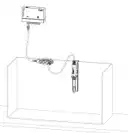
1. Connect the probe’s lead to the Data Port on ReefControl Power. If you have a Control Panel, you can use its Data Port instead.
2. Position the probe in the water with good flow around the tip.
3. Arrange the cable into a drip loop so water can’t run down it to the connector.

Note:
The Data Port takes one connection at a time – a Temperature Probe, the Control Panel, or a ReefControl Pro/Lite. If a Control Panel or ReefControl Pro/Lite already occupies ReefControl Power’s Data Port, connect the probe to the Control Panel’s own Data Port, or – if a ReefControl Pro/Lite is connected – set the probe up through it instead.
With a ReefControl Pro/Lite
1. Connect the probe to the ReefControl Pro/Lite’s ReefSense port connector cable, making sure the securing nut is fully closed for a stable, waterproof connection.
2. Position the probe in the water with good flow around the tip.
3. Arrange the cable into a drip loop so water can’t run down it to the connector.
Adding the probe in the ReefBeat App
With ReefControl Power. With the probe connected to the Data Port, open your ReefControl Power in the ReefBeat App. The temperature appears as its own item, where you can name it, set its ranges, and choose its options. (If a newer version of the probe’s firmware is available, the app updates it first over Bluetooth – keep your phone within approximately 3 m (10′) of the probe and leave the app open during the update.)
With a ReefControl Pro/Lite. Open your ReefControl Pro/Lite in the app, choose Setup Probe, and select Temperature. Confirm the probe the app has found and let it update its firmware if prompted (this happens over Bluetooth; keep your phone within approximately 3 m (10′) of the probe), then name it and set its ranges.
Note:
You can add more than one Temperature Probe to the same ReefControl Pro/Lite. If you do, connect and set them up one at a time. If several new probes are connected at once before setup, the controller picks one of them at random, and you’ll have to check serial numbers to tell which is which.
Note:
Temperature follows your aquarium’s volume unit – °C when the volume is set in litres and °F when it’s set in gallons.
Temperature ranges, logs and notifications
For the probe you set two ranges that tell the controller what “normal” looks like for your tank: a Desired range (green, your target) and an Acceptable range (orange, drifting away from the target). Anything outside the Acceptable range is automatically the Danger range (red) – you don’t set this yourself. Your reading shows against these on the homepage and in the graph, and you can choose to be notified when it enters its Danger range (and again when it returns to normal).
On a ReefControl Pro/Lite you can also switch on the audible alarm for the probe; it is then enabled whenever the temperature is outside the Acceptable range, and a short press of the Manual Control button silences it.
Other options include a Manual reading on demand, and a graph and 30-day log of minimum, maximum and average temperature, which you can export as a CSV file.
Temperature adjustment
The Temperature Probe is accurately calibrated during production and does not need calibrating. If you notice a small difference between it and another thermometer on your aquarium, you can align the two with the Temperature adjustment option: enter the reading from your reference thermometer and the app works out an offset. A Reset Temperature link removes the adjustment and returns the probe to its factory calibration.
Using the temperature reading to control equipment
The Temperature Probe’s reading can switch equipment on and off automatically – most commonly a heater, chiller or cooling fan.
On ReefControl Power (no ReefControl Pro/Lite needed). With the probe connected to the Data Port, set a socket to Sensor control by the Temperature Probe and choose the condition – for example, switch a cooling fan on above a set temperature, or switch a heater off if it climbs too high. Each socket also has a fallback state (Always ON or Always OFF) that it returns to if the probe is ever disconnected, so your equipment stays in a safe, known state. This standalone temperature control works even without a home network, in Direct mode.
With a ReefControl Pro/Lite. The temperature reading can control the ReefControl Pro/Lite’s 12 VDC ports, or – if you also have a ReefControl Power paired with it – any of its AC sockets.
You can set a margin (hysteresis) so equipment doesn’t switch rapidly on and off around the threshold. With the probe connected directly to ReefControl Power, one margin applies to every socket the probe controls; through a ReefControl Pro/Lite, each socket can have its own. The margin is set in the app. (See your ReefControl Power or ReefControl Pro/Lite manual for how to assign a socket or port to the probe.)
Remote mode
You can use the Temperature Probe away from ReefControl Power or the ReefControl Pro/Lite, over Bluetooth – handy for a quick spot-check reading somewhere else.
1. Turn on remote use for the probe in the ReefBeat App.
2. Disconnect the probe from the Data Port (or the ReefControl Pro/Lite’s ReefSense port).
3. Power the probe with the ReefSense USB-C connector (R35838, sold separately), plugged into any USB-C source.
4. With your phone or tablet’s Bluetooth on, tap Connect in the app to start the Bluetooth (BLE) connection; the app then shows an instant manual reading.
When you’ve finished, return the probe to its place and wait about 30 seconds before cancelling remote mode in the app, to keep stray readings out of your logs.
Firmware updates
From time to time the ReefBeat App will let you know that a firmware update is available for your Temperature Probe. Keeping the firmware up to date ensures it stays compatible with the app. Firmware updates are performed via Bluetooth; the probe must be connected to your ReefControl Power or ReefControl Pro/Lite and not in Remote mode (ensure Bluetooth is enabled in your phone’s settings). When you run an update, keep your phone within approximately 3 m (10′) of the probe and leave the app open during the update.
Moving the Temperature Probe from ReefControl Power to a ReefControl Pro/Lite
If you’ve been using the Temperature Probe directly on ReefControl Power and later want it on a ReefControl Pro/Lite instead, move it in three steps:
1. In the ReefBeat App, delete the probe from your ReefControl Power.
2. Disconnect the probe from the Data Port and connect it to the ReefSense port on your ReefControl Pro/Lite.
3. Re-install the probe in the app under the ReefControl Pro/Lite – see Adding the probe in the ReefBeat App.
Moving it the other way – from a ReefControl Pro/Lite back to ReefControl Power – follows the same pattern: delete it from the ReefControl Pro/Lite, connect it to ReefControl Power’s Data Port, and add it again there.
Maintenance
The Temperature Probe is robust and not a wear part, but it reads best when kept clean.
Routine cleaning. Rinse the probe under RO water to remove salt and loose film. After a routine rinse it can go straight back into service.
Removing stubborn fouling. If organic film or mineral deposits have built up, clean in two stages, rinsing well with RO water between and after each stage:
1. Remove organics first with a diluted, plain (unscented) household bleach solution – 1 part bleach to 10 parts RO water. Soak the tip for 2-5 minutes, then rinse thoroughly with RO water.
2. Then remove mineral deposits with Red Sea’s probe cleaning solution (R35855), a weak acid, diluted 1:10 with RO water. Soak for 2-5 minutes, then rinse thoroughly with RO water.
WARNING:
Never allow bleach and the acid cleaning solution to mix – combining them releases toxic chlorine gas. Rinse the probe thoroughly with RO water between the two stages, never soak it in both at once, and handle household bleach with care.
Tip:
Before taking the probe out of the water – for cleaning, for example – turn on Disable Probe in its settings so out-of-water readings aren’t recorded. Remember that a port or socket controlled by the probe switches to its fallback state while the probe is disabled.
Troubleshooting
Press here for the Troubleshooting guide for the full ReefControl Family
Warranty
Note:
The ReefSense Temperature Probe carries the standard 24-month Red Sea warranty.