Loading
ReefSense ATO Sensor
Introduction
The ReefSense ATO Sensor is a digital water-level sensor with a built-in temperature sensor. Used on its own with your ReefControl Pro/Lite, it lets you build your own automatic top-off (ATO): the sensor watches your sump’s water level and switches a top-off pump on and off to replace the fresh water lost to evaporation – keeping your salinity stable without daily manual top-ups. At the same time it reports your water temperature to the ReefBeat App, with ranges, a log and notifications.
You connect your own top-off pump to a 12 VDC port on your ReefControl Pro/Lite, or to an AC socket on a paired ReefControl Power, and the ATO Sensor controls it.
This manual assumes you already have a ReefControl Pro/Lite set up and running in the app.

Note:
If you’d prefer a complete, ready-to-run top-off with a matched pump, tubing and a siphon breaker, see the separate ReefControl ATO Module manual instead.
How the ATO Sensor works
The ATO Sensor has two level pins – a lower “pump-on” pin and an upper “pump-off” pin. You mount the sensor so that your target water level sits between the two. When evaporation lowers the level to the pump-on pin, the sensor switches your top-off pump on; when fresh water has refilled to the pump-off pin, it switches the pump off. This holds your water level within a narrow band (about 3 mm / ⅛”).
As a built-in safety backup, the sensor also has a backup “pump-off” pin about 2.5 cm (1″) above the normal pump-off pin. If the normal pump-off pin ever fails to sense the rising water, the backup pin stops the fill – guarding against an overfill. This safeguard is part of the sensor itself, so it works whether the sensor is used on its own or as part of the ReefControl ATO Module.
The same sensor also reads your water temperature continuously, so it works like a ReefSense Temperature Probe at the same time.
What’s in the box
• ReefSense ATO Sensor (water level + built-in temperature) – R35829
To mount the sensor you’ll need the ATO Sensor holder (R35629), sold separately; on a non-Red Sea sump you’ll also need the magnetic corner mounting bracket (R35623) to fix the holder in place.
What you’ll need for top-off
To put together a top-off you’ll also need:
• A top-off pump suited to fresh (RO/DI) water – a 12 VDC pump for a port on your ReefControl Pro/Lite, or a mains pump for an AC socket on a paired ReefControl Power.
• A fresh RO/DI water reservoir and tubing to carry water from the reservoir to your sump.
• A free 12 VDC port on your ReefControl Pro/Lite (or a free AC socket on a paired ReefControl Power) for the pump.
Note:
For a complete, protected top-off with a matched ATO Pump, silicone tubing, tube holder and a siphon breaker – all ready to run – use the ReefControl ATO Module (see its own manual).
Mounting the ATO Sensor
Mount the sensor in the return-pump chamber of your sump, where the water level is stable.
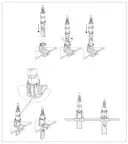
1. Fix the sensor holder in the return-pump chamber. On a Red Sea aquarium it clicks onto the glass triangle; on a non-Red Sea sump, attach the holder to the magnetic corner bracket and mount it on an internal wall so the sensor hangs vertically.
2. Slide the ATO Sensor into the holder and click it into the higher or lower position, whichever suits your sump, so that your target water level falls between the pump-on and pump-off pins. The level will settle to this point once top-off is running.
3. Connect the sensor to the ReefSense port connector cable, making sure the securing nut is fully closed, and arrange the cable into a drip loop.
Then set up the water side:
4. Stand the top-off pump in your RO/DI reservoir and run the tubing up to your sump. Fix the tube outlet above the highest level the sump will reach, and preferably not directly above the sensor.
Note (preventing a flood):
The sensor’s backup pump-off pin guards against an overfill if the normal pump-off pin is ever missed, but used on its own the ATO Sensor does not include the ReefControl ATO Module’s siphon breaker or its pump run-dry and time-out protection. To stay safe, keep the tube outlet above the maximum sump water level so it can’t siphon; if the reservoir can ever sit higher than the outlet, fit a siphon break in the tubing; keep the reservoir from running dry; and set the pump’s port/socket fallback to OFF (see below). Always top off with fresh RO/DI water only – never saltwater.
Adding the ATO Sensor in the ReefBeat App
1. Open your ReefControl Pro/Lite in the ReefBeat App, choose Setup Probe, and select ATO & Temperature – not the ATO Module (the ATO Module option is for the complete Red Sea top-off system).
2. Confirm the sensor the app has found, then continue. If a firmware update is available, let it run (see Firmware updates).
3. Give the sensor a name, and set its temperature ranges and audible-alarm preference.
Setting up the top-off (controlling your pump)
1. Connect your top-off pump to a free 12 VDC port on your ReefControl Pro/Lite, or plug it into an AC socket on a paired ReefControl Power.
2. In the app, set that port or socket to be controlled by the ATO Sensor (its water level). See your ReefControl Pro/Lite manual for assigning a 12 VDC port, or the ReefControl Power manual for assigning a socket.
3. Set the port or socket’s fallback state to OFF, so the pump cannot keep running if the sensor is ever lost or disconnected.
There’s nothing else to set: the pump runs when the water level is low and stops once it is restored. Because the sensor holds the level between its two pins, the pump switches cleanly on and off without rapid cycling.
WARNING:
A top-off moves water automatically and can overflow a tank if it is set up carelessly. Keep the tube outlet above the maximum sump level, guard against siphoning, don’t let the pump run dry, and check the system regularly – especially in the first days after setting it up. For built-in flood protection, use the ReefControl ATO Module.
Temperature
The ATO Sensor’s built-in temperature sensor works just like a ReefSense Temperature Probe:
• Set the Desired and Acceptable ranges (anything beyond the Acceptable range is automatically the Danger range), choose to be notified if it enters the Danger range, and (on your ReefControl Pro/Lite) switch on the audible alarm if you want it.
• View a Manual reading on demand, and a 30-day log of minimum, maximum and average temperature, exportable as a CSV file.
• The sensor is accurately calibrated in production and doesn’t need calibrating. If it differs slightly from another thermometer, align them with Temp Adjustment (enter your reference reading and the app works out an offset); Reset Temperature removes the adjustment.
The temperature reading can also control equipment. If a 12 VDC port is free on your ReefControl Pro/Lite (for example Port 2 on a Pro, with the pump on the other port), the temperature can run a device such as a cooling fan there; and if a ReefControl Power is paired with your ReefControl Pro/Lite, the temperature can control any of its AC sockets, such as a heater or chiller.
Firmware updates
From time to time the ReefBeat App will let you know that a firmware update is available for your ATO Sensor. Keeping the firmware up to date ensures it stays compatible with the app. Firmware updates are performed via Bluetooth (ensure Bluetooth is enabled in your phone’s settings). When you run an update, keep your phone within approximately 3 m (10′) of the sensor and leave the app open during the update.
Water changes and sump maintenance
During a water change – or any time you’re working in the sump – the water level moves around, and the top-off may try to “correct” it by adding RO water when you don’t want it to. Before you start, pause the top-off: set the pump’s port or socket to Always OFF, or switch its sensor control off, for the duration of the work. Turn it back on when you’ve finished.
Maintenance
Keep the sensor free of organic waste, algae and salt deposits. It is waterproof and can be rinsed under running water, and its titanium tips can be brushed to remove hard deposits – it’s worth wiping the sensor pins about once a month so the level reading stays reliable. Switch the top-off off before lifting the sensor out for cleaning, so the pump doesn’t run while the sensor is out of the water.
Note:
The Red Sea probe cleaning solution is a weak acid for pH, ORP and Salinity probes and is not suitable for the ATO Sensor’s titanium tips – clean the sensor by rinsing and brushing only.
Tip:
Before lifting the sensor out of the water – for cleaning, for example – pause its log in the sensor’s settings so out-of-water readings aren’t recorded. Remember that a port controlled by the sensor switches to its fallback state while the sensor is out.
Troubleshooting
Press here for the Troubleshooting guide for the full ReefControl Family
Warranty
Note:
The ReefSense ATO Sensor carries the standard 24-month Red Sea warranty.